Introduction
Are you ready for an honest HubSpot CRM review?
HubSpot holds a strong position among modern CRMs. It’s undeniable that it is a reliable platform packed with multiple features that help businesses grow their revenue.
However, jumping straight into an $800/month Pro subscription can be risky for many small businesses.
That’s exactly why we decided to create this HubSpot CRM review, to help small business owners decide whether HubSpot is truly the best CRM for their needs, or if it makes more sense to look for more affordable alternatives or platforms with more features.
What is HubSpot CRM?
If you’ve landed on this HubSpot CRM review, you’re probably wondering what exactly HubSpot CRM is.
Think of HubSpot as a whole ecosystem made up of different “Hubs”: Marketing, Sales, Service, Content, Operations… a full suite designed to run nearly every corner of your business.
But in this HubSpot CRM review, we’re zooming in on the features included in the Customer platform, because having a CRM without basic features like creating email campaigns is worthless.
And yes, this platform is polished, powerful, and pretty user‑friendly… but also full of surprises (some pleasant, some expensive).
That’s why this HubSpot CRM review exists: so you know exactly what you’re getting into before you swipe your card.
What I should look for in a CRM?
Nowadays, a CRM is a key part of any business. It’s the place where all your customer information lives , which means you should choose a tool that feels easy to use, offers continuous customer support, and can be used by multiple members of your team (especially sales and marketing).
Your CRM should also be able to scale with your budget, rather than limit your growth. And last but not least, it should include AI features that are actually worth using.
Our recommendation? Sign up for a free trial to confirm the CRM chosen aligns with your workflow before purchasing.
Also, most CRM platforms offer demos where you can talk with an expert who helps you decide whether the CRM you’re considering is truly a good fit for your business.
Key Features we Analyzed for this HubSpot CRM Review
After exploring the software, let’s talk about what really matters in this HubSpot CRM review: the features that can make or break your daily workflow.
Instead of overwhelming you with every button and submenu HubSpot offers, we focused on the essentials that small businesses actually care about, the tools that save time, reduce chaos, and help you grow without needing a full‑time tech team.
Here are the key features we analyzed and our perspective about each one, so you can decide whether HubSpot CRM is the perfect match.
- Contact Management: HubSpot’s contact management instantly enriches your contacts using a massive business database, pulling in useful details like company size, industry and even tech stack. Free users still have to enter the basics manually, but HubSpot does auto‑log emails, calls and meetings to build a clean, easy‑to‑follow timeline.
- Sales Pipeline Management: HubSpot makes pipeline management pretty straightforward: you can track deals, move them across stages, and keep everything organized without needing a complicated setup[1].
- Marketing Automation: HubSpot’s marketing automation is one of its strongest attractions, at least once you move past the free plan. You get workflows, email sequences, tagging, and behavior‑based actions that help you nurture leads
- Customer Service Tools: On the customer service side, HubSpot offers a simple but effective toolkit: tickets, shared inbox, and basic automation that helps teams stay organized. As you climb the pricing ladder, you unlock more advanced features like customer portals, feedback surveys, routing rules and full ticket workflows.
- Reporting and Analytics: HubSpot provides detailed reports and dashboards to track performance and measure the effectiveness of sales and marketing efforts.
- Integration with Other Tools: HubSpot’s reporting and analytics give you a solid overview of what’s happening across your sales, marketing, and service activities. Just keep in mind that the most powerful reporting features live behind the higher‑priced plans.
Pricing Plans
I is impossible to do a HubSpot CRM review and ignore one of the mos important aspects: The price.
This platform offers several pricing tiers to accommodate different business needs.
We want to highlight that HubSpot prices changes frequently. At the date of writing this article these are the prices:
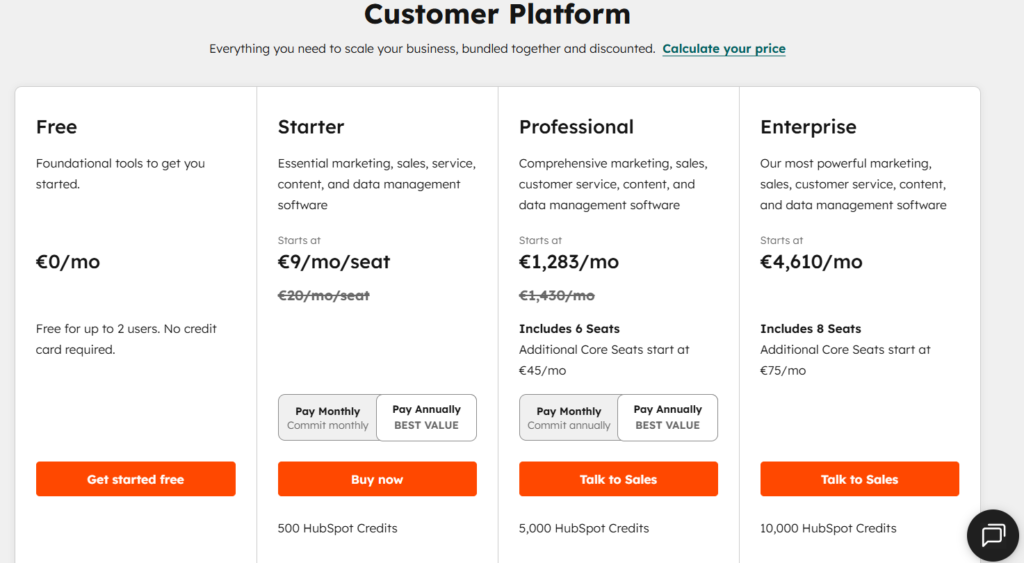
However, these prices can also change according to your business size and needs.
As you can see, the prices shown are the starting prices; after choosing your plan, you may find additional fees added for HubSpot to fit your needs.
Looking for an affordable CRM?
We have an alternative impossible to ignore, just for $127 monthly.
HubSpot CRM — Simple Pricing & Feature Comparison (2026)
Price is not enough to make a HubSpot CRM review. That´s why we checked the main features, so you know what you can expect from each plan. Because we are focused on helping small businesses, we excluded the Enterprise plan from this review.
| Feature / Plan | Free | Starter | Professional |
|---|---|---|---|
| Price | $0/mo (free foundational CRM tools) | Starts at $10/mo | Starts at $1300/mo (Maximum 6 users, otherwise you should pay $50 for each new user) |
| Simple Marketing Automation | 1 automated action. Up to 2,000 monthly emails | Up to 10 automated actions. 5x marketing contact tier email send limit monthly | Unlimited actions, plus omni-channel marketing automation. 10x marketing contact tier email send limit |
| Email Templates | 3 templates | 5000 templates | 5000 templates |
| Social Media Automation | No included | No included | Up to 50 connected accounts |
| Conversational bots | Limited features, includes HubSpot branding, simple messages and quick replies | Limited features, Remove HubSpot branding, | Includes advanced Messenger bot branching and advanced reporting, |
| Documents | Up to 5 documents per account | Up to 5,000 documents per account Remove HubSpot branding | Up to 5,000 documents per account Remove HubSpot branding |
| Reporting Dashboards | Basic dashboards + email analytics | More robust reporting depending on the Hub | Advanced analytics + attribution modeling |
Pros and Cons HubSpot CRM
After analyzing all the core features and pricing of each plan, we discovered the main pros and cons for small businesses.
| ✔️PROS | ✖️CONS |
| Free plan available User-friendly interface Strong integration options | Advanced sales and marketing tools require costly subscriptions The entry-level plan has a limited feature set Customer service experience could be better Expensive acces to the unlimited chatbot features Expensive for businesses looking to scalate |
Is HubSpot CRM Right for Your Business?
HubSpot CRM is a reliable software with multiple valuable features that are essential for any business. However, that does not mean that it is the ideal solution for every type of business.
We recommend HubSpot CRM for:
- Solopreneurs and very small startups that need a simple way to manage contacts, deals and basic pipelines.
- Small businesses that are not planning to grow soon and are just looking for the simplest features.
- Businesses with large tech stacks.
We do not recommend HubSpot CRM for:
- Growing small businesses with plans to scale.
- Small businesses that WANT TO SCALE, without investing tons of money in each step.
- Small teams who needs to automate more tasks.
- Teams looking for an all-in-one solution that includes marketing and sales in the same plan.
HubSpot CRM Review Final Veredict
After reviewing HubSpot CRM from every angle, here’s the bottom line: it’s a strong option for small and medium‑sized businesses, offering solid tools for contact management, deal tracking, and sales automation.
The platform is clean, intuitive, and easy for teams to adopt.
That said, HubSpot isn’t perfect. The support tiers create a frustrating gap where entry‑level paid users don’t get access to real‑time help, and as your team grows, pricing can escalate quickly.
What starts as a reasonable investment can turn into something harder to justify.
That means that if your goal is to scale and grow your team, HubSpot could drain a lot of your budget.
That said, there are CRM options that offer the same core functionalities as HubSpot, powerful AI integrations included, but at a fixed price, with unlimited users and full access to all features.
That’s why we created the next section, where you’ll discover an alternative that might just become the smartest investment your business makes.
Get all the HubSpot features, paying less
And make your business grow automatically
Cheaper Alternatives to HubSpot CRM
After reading this HubSpot CRM review, you are maybe wondering. Are there more affordable alternatives?
Well, finding an affordable all in one CRM is a hidden gem.
However, among all the CRM options, there is one that has an unbeatable offer: All the features, unlimited for the same price, no matter the size of your business.
This platform is TwiLead, an all-in-one sales and marketing automation platform powered by AI that offers all the features included in the HubSpot professional plan, just for 127$ per month.
There are some of the features you can get wih TwiLead PRO plan:
| Feature | PRO TwiLead Plan |
|---|---|
| Price | $127/mo |
| Marketing Automation | Unlimited automated actions. Unlimited emails. Omni-channel marketing automation |
| Email Templates | +600 templates |
| Social Media Automation | Integration with Instagram, Facebook, LinkedIn, TikTok, Threads, Bluesky and more. |
| Conversational bots | Includes advanced bot branching, unlimited bots, and advanced aswers |
| Documents | Unlimited |
| Reporting Dashboards | Advanced dashboards on campaigns + email analytics |
| Contacts | Unlimited |
As you have seen, to get all those features you should pay at least $1300 montlhy in HubSpot plans.
With TwiLead, that price drops dramatically to just $127, and doesn´t increase if your business grow.
We know it sounds hard to believe, but TwiLead has the mission to help small businesses scale, without breaking the bank.
Want to get an affordable, yet powerful CRM?
You are just a click away
References
[1] HubSpot CRM Review 2025: Pricing, Features, Pros & Cons – CRM.org
[2] HubSpot CRM Review: Features, Pros & Cons – Forbes Advisor
[3] An honest HubSpot CRM review in 2025: Is it a good fit for your business?
[4] 45 CRM Statistics You Need to Know in 2025
[5] Hu b S p ot
[6] 33 CRM Statistics 2025 — Usage & Market Share – Demand Sage
[7] TwiLead – The Ultimate Sales & Marketing Automation Platform …