Introduction
Salesforce is one of the most popular CRMs out there, and if you’ve never heard of it, it’s probably because this is your first time facing the decision of choosing a CRM for your business, an exciting milestone that shows you’re growing.
It’s almost impossible to talk about good CRMs without mentioning Salesforce, but its reputation also hides weaknesses that often turn into real nightmares for many entrepreneurs and growing marketing and sales teams.
While Salesforce does offer some attractive entry‑level plans, the truth is that the features most businesses are excited about are usually the most expensive.
Many large, well‑known companies love Salesforce, but a quick look at small business forums makes it clear that for many SMB owners, Salesforce hasn’t been the best choice. Instead of simplifying their operations, it’s often made things more complicated.
That’s exactly why we decided to create this Salesforce Review, to explore the platform’s different plans and gather insights from dozens of users who have actually used the software in their day‑to‑day business.
The result is one of the most complete and honest Salesforce reviews you’ll find anywhere online.
Up next, you’ll discover the good, the not‑so‑good, the pricing, the pros and cons, and whether this software is truly the right operational partner for your business.
What is Salesforce CRM?
Salesforce CRM is a cloud-based software designed to help businesses manage their customer relationships, sales processes, and marketing efforts. It offers a comprehensive suite of tools, including sales automation, customer service, marketing automation, and analytics.
Salesforce is particularly popular among large enterprises due to its scalability and extensive customization options.
Salesforce Review: A Closer Look at What Works, and What Doesn’t
Salesforce is one of the most recognizable names in the CRM world.. But as any small business owner knows, a strong reputation isn’t enough.
In this Salesforce Review, it’s clear that the platform brings a lot to the table: robust contact and lead management, solid customer service tools, detailed reporting, marketing features, and plenty of integrations. Everything you need to capture leads, nurture them, and turn them into loyal customers is technically there.
You can even build websites, set up automated email sequences, and much more. On paper, it’s an impressive all‑in‑one system.
Where things get tricky is beneath the surface. At first glance, Salesforce feels straightforward, but once you start exploring the deeper features, complexity kicks in.
To enjoy its all-in-one system you need to opt for their more expensive plans, which are limited to 1 user and overpass the $100 monthly per user. Besides, despite show a monthly price, the true is that plans are billed annually and in advance.
Some tools become harder to navigate, and during testing, pages sometimes loaded slowly, or didn’t load at all. That frustration mirrors what many users mention in their Salesforce reviews online, which raises valid concerns for SMBs that need speed and simplicity to hit the ground running.
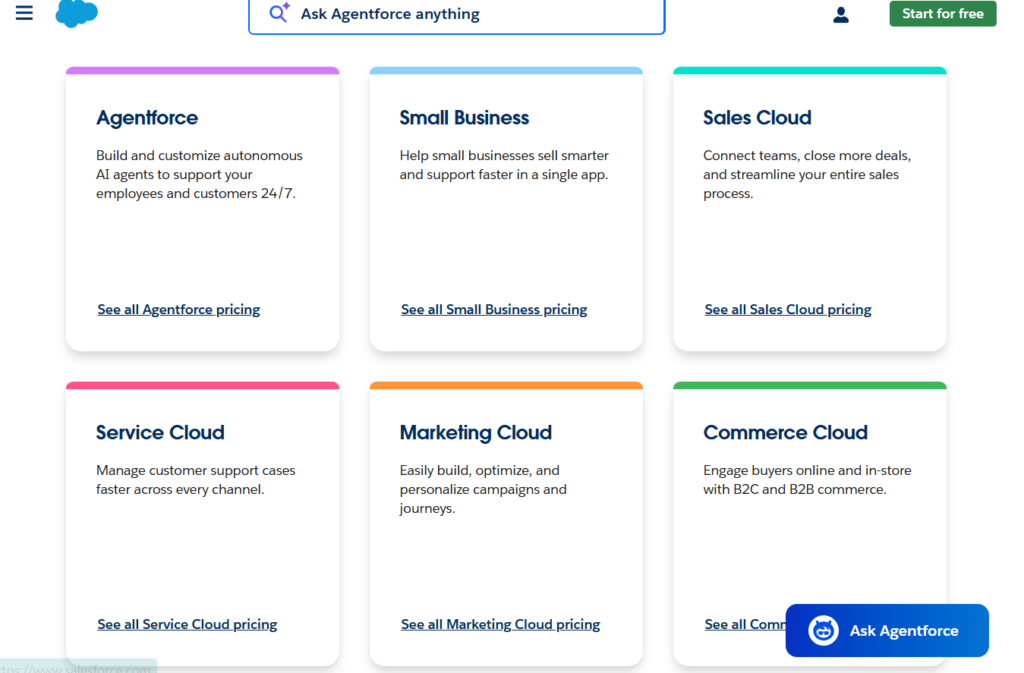
Even choose the right plan could be overwhelming demands a lot of time, because the amount of plans is insane, we are not overreacting when we say that you could spend hours analyzing their prices -as we did it-.
And if you think we are kidding or overreacting, you can look how the first section of the pricing page looks…
That means, if what you want is quick setup and smooth workflows from day one, lighter CRMs like TwiLead may fit better.
Anyway, if you have the time, budget, and patience to invest in it — and you don’t mind the occasional glitch — Salesforce could be a good option for your business.
Otherwise, we recommend you to explore other options.
At the end, the choice is yours, so to help you make an strategid decision, in this Salesforce Review, we’ll walk you through the five features that stood out most during testing, so you can decide whether its strengths outweigh the complexity for your business.
Main Features Explored for our Salesforce Review
- Sales Cloud: Salesforce’s Sales Cloud provides tools for managing leads, opportunities, and sales pipelines. It includes features like contact management, sales forecasting, and workflow automation.
- Service Cloud: This module helps businesses deliver exceptional customer service through case management, knowledge base, and omnichannel support.
- Marketing Cloud: Salesforce’s Marketing Cloud offers tools for creating personalized marketing campaigns, email marketing, social media management, and customer journey mapping.
- Commerce Cloud: This module enables businesses to create seamless online shopping experiences with features like product management, order management, and customer insights.
- Einstein AI: Salesforce’s AI-powered assistant, Einstein, provides predictive analytics, automated insights, and intelligent recommendations to enhance decision-making.
- AppExchange: Salesforce’s marketplace offers thousands of third-party apps and integrations to extend the functionality of the CRM.
Pricing Plans
Landing to the Salesforce pricing page could feel overwhelming. They have multiple options, which make difficult for small businesses to know which is the best one for them.
Our mission is to help small businesses to get more leads and scale, that´s why we analyzed the pricing plans and features included into the Small Business Pricing section.
- Sales Cloud Essentials: $25 per user per month (billed annually)[2].
- Sales Cloud Professional: $75 per user per month (billed annually)[2].
- Sales Cloud Enterprise: $150 per user per month (billed annually)[2].
- Sales Cloud Unlimited: $300 per user per month (billed annually)[2].
- Marketing Cloud Basic: $400 per month (billed annually)[2].
- Marketing Cloud Pro: $1,250 per month (billed annually)[2].
- Marketing Cloud Corporate: $3,750 per month (billed annually)[2].
Pros and Cons
| Cons | |
| Thousands of integrations | Salesforce’s free plan is nothing more than a demo, trial subscriptions cannot be used in a production capacity. Plans are billed anually, so you need to invest at least $1200 to get acces to the advanced plan. Paid plans only include 1 user. You need to pay a new yearly subscription for any extra user. Some tools are complex The software can be slow and glitchy |
Pros:
- Highly customizable[3].
- Extensive feature set[3].
- Strong AI capabilities[3].
- Robust integration options[3].
Cons:
Is Salesforce Right for Your Business?
We recommend Salesforce for:
- Small and mid-sized businesses with healthy cash flow.
- Teams that require a CRM capable of integrating smoothly with an existing tech stack.
However, Salesforce might not be ideal for:
- Startups or small teams working with a tight software budget.
- Businesses that need an affordable plan with essential features included.
- Teams that can’t invest time in learning software that can sometimes feel complex or overwhelming.
If this Salesforce Review leaves you doubting whether Salesforce is the best fit, there’s no need to stress. And if what you’re looking for is a simpler, more intuitive CRM powered by automation and AI — Twilead offers a streamlined, all‑in‑one experience that helps SMBs get up and running fast without the complexity or the high price tag.
Conclusion
Salesforce CRM is a powerful tool for managing customer relationships, offering a range of features that can help businesses improve their sales performance. With the latest trends and statistics for 2025, it’s clear that CRM systems like Salesforce are essential for adapting to the evolving sales landscape. TwiLead can further enhance your CRM experience by providing comprehensive sales and marketing automation, making it easier to generate leads, convert sales, and manage customer relationships.
How TwiLead Can Help
TwiLead is an all-in-one sales and marketing automation platform that can enhance your CRM experience. Here’s how TwiLead can help:
- Lead Generation: TwiLead helps generate more qualified leads through its marketing hub, which includes websites, funnels, forms, and surveys[7].
- Sales Conversion: The platform offers unlimited sales pipelines, online calendars, booking, proposals, invoices, and payments[7].
- Customer Management: TwiLead’s CRM suite allows you to manage unlimited contacts, track activities, and leverage valuable customer data[8].
- Automation: TwiLead automates operations using a world-class workflow builder, saving time and improving efficiency[7].
- Integration: TwiLead integrates with existing tools, centralizing all lead and communication sources[7].
References
[1] Salesforce Review 2025: CRM Features, Pricing, Pros & Cons – CRM.org
[2] Salesforce CRM Review and Pricing in 2025 – business.com
[3] Salesforce CRM Review: Features, Pros & Cons – Forbes Advisor
[4] Salesforce Announces Third Quarter Fiscal 2025 Results
[5] Salesforce Announces Fourth Quarter and Fiscal Year 2025 Results
[6] Salesforce Announces Fourth Quarter and Fiscal Year 2025 Results
[7] TwiLead – The Ultimate Sales & Marketing Automation Platform …