
You’re juggling too many tools. Your email platform doesn’t talk to your CRM. Your website forms feed one system, but your sales pipeline lives in another. Sound familiar? It’s a mess. And it’s costing you time and money.
That’s where marketing automation CRM integration comes in. It connects your marketing tools with your customer database so everything works together. No more manual data entry. No more missing leads. Just a smooth flow of information from first click to closed deal.
In this guide, you’ll learn exactly how to set up marketing automation CRM integration in five steps. We’ll cover assessing your needs, connecting platforms, mapping data fields, building automated workflows, and monitoring results. By the end, you’ll have a system that works for you, not against you.
Step 1: Assess Your Needs and Choose the Right Tools
Before you connect anything, you need to know what you’re working with. Start by listing the tools you use every day. Your CRM. Your email marketing software. Your website builder. Your calendar booking system. Write them all down.
Now ask yourself: What’s the biggest pain point? Is it duplicate data? Slow follow-ups? Leads falling through the cracks? Your integration should solve the most painful problem first.
on CRM integrations, small businesses that integrate their CRM with other tools see big gains in efficiency. They spend less time switching between apps and more time building relationships. That’s the goal.
What to look for in a platform
- Native integrations: Does the platform already connect to your tools? Native connections are easier to set up and more reliable than third-party bridges.
- Data syncing: Does it sync in real time? Delays can cause errors.
- Workflow automation: Can you build simple triggers and actions without coding?
- AI capabilities: More platforms now include AI to automate tasks like lead scoring and follow-up sequences.
Only 43% of marketing-automation-focused CRMs include a built-in website builder. But platforms like TwiLead bundle everything together: CRM, email automation, website builder, booking system, and AI agents. That means fewer integrations to manage and a lower total cost.
When evaluating tools, think about future growth. A solution that works for 100 contacts might choke on 10,000. Look for unlimited users and contacts, like TwiLead offers at a flat $127 per month.
Don’t overcomplicate this step. You don’t need every bell and whistle. Pick a tool that does the core things well and can grow with you.
Bottom line: Choosing the right platform for your marketing automation CRM integration starts with identifying your biggest pain points and selecting a tool that natively connects your must-have apps.

Step 2: Connect Your Marketing Automation and CRM Platforms
You’ve chosen your platform. Now it’s time to make the connection. Most modern tools offer a built-in integration wizard. You log in to both accounts, authorize the connection, and choose what data to sync.
Here’s a general process that works for most integrations, including TwiLead’s:
- Go to the settings or integrations menu in your marketing automation tool.
- Find your CRM in the list of available integrations.
- Click “Connect” and log in to your CRM account.
- Grant permission for the two systems to exchange data.
- Select the data you want to sync (contacts, deals, activities).
- Test the connection by creating a new contact in one system and checking if it appears in the other.
Almost every CRM integration follows this pattern. The hard part is deciding what to sync. Start with the basics: contact name, email, phone number, and lead source. You can add more fields later.
Some platforms offer two-way syncing. That means a change in your CRM updates the marketing tool and vice versa. Two-way sync is ideal because it keeps data consistent across your entire system. But it requires careful configuration to avoid overwriting important information.
| Feature | Native Integration | Third-Party Connector (like Zapier) |
|---|---|---|
| Ease of setup | Easy (few clicks) | Moderate (requires mapping) |
| Reliability | High | Medium (dependent on third party) |
| Cost | Often included | Extra monthly fee |
| Real-time sync | Usually yes | Depends on plan |
| Customization | Limited to what platform offers | High (build custom workflows) |
Native integrations are almost always better. They’re faster, more secure, and don’t require extra subscriptions. TwiLead, for example, offers native connections to popular tools like Stripe, PayPal, Zoom, and WordPress. If you need something custom, there’s an API.
Bottom line: Connecting your platforms is usually a straightforward process of authorization and data selection, but choosing native integrations over third-party bridges saves time and money.
Step 3: Map Data Fields and Sync Your Contacts
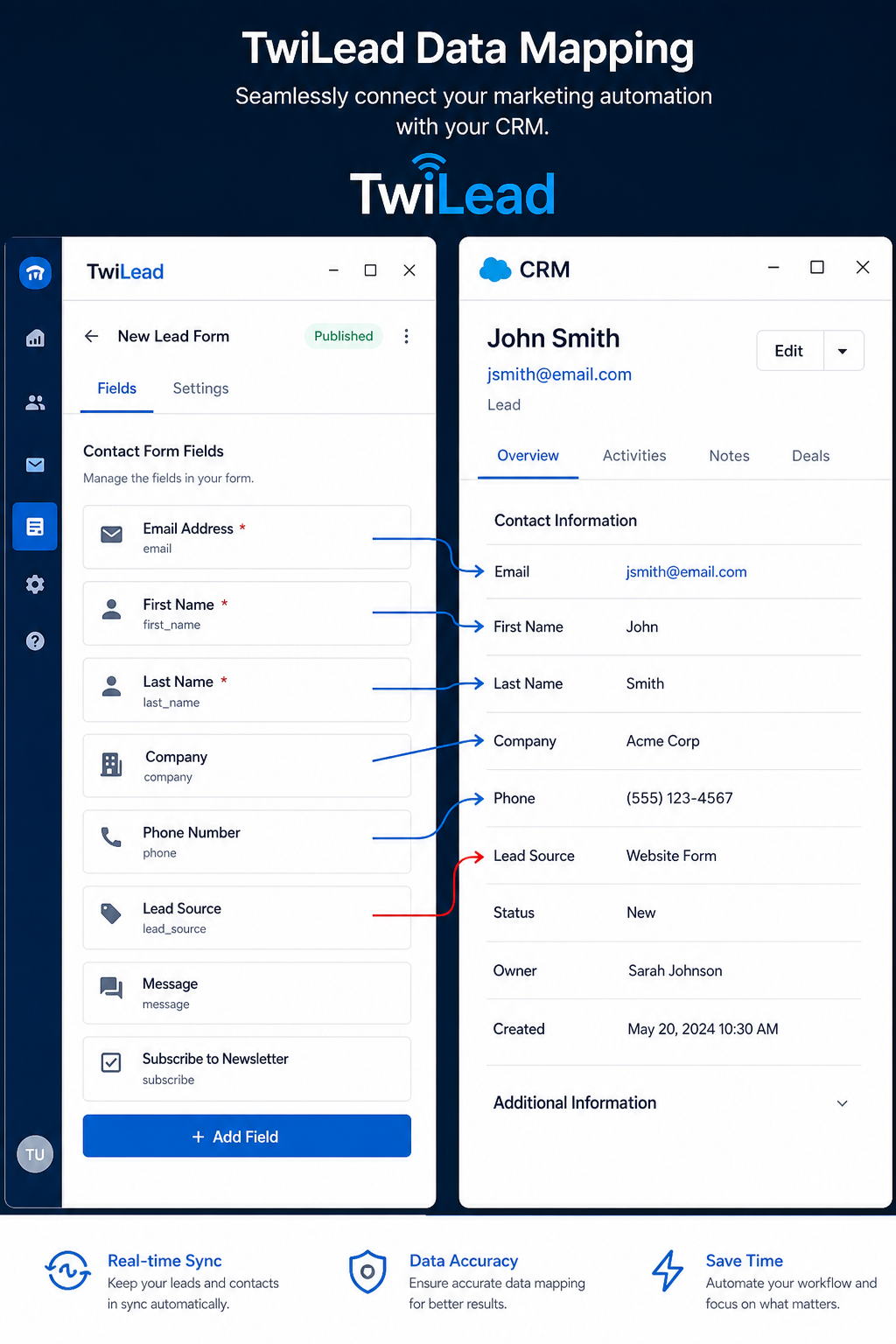
Now comes the detail work. Data mapping means telling your systems which fields correspond to each other. For example, “First Name” in your email platform might be labeled “First Name” in your CRM, but sometimes one system calls it “Given Name.” You need to match them.
Most integration wizards have a mapping screen. You’ll see two columns: one for the source (your marketing tool) and one for the destination (your CRM). Drag or select the matching fields. Common fields include:
- Email address
- First and last name
- Phone number
- Company name
- Lead source
- Date added
- Custom fields (e.g., “Industry” or “Product Interest”)
Why is this important? If you skip mapping, data gets messy. Duplicate contacts appear. Names get jumbled. And your automated workflows send the wrong messages. According to a guide on MarketingOps, proing and personalization. A clean database is the foundation of effective automation.
Take it slow. Test with a handful of contacts first. Create a dummy contact in your marketing tool, trigger a sync, and check that all fields populate correctly in the CRM. Correct any mismatches.
Also decide on a master system. Will your CRM be the source of truth, or your marketing automation tool? Usually the CRM is the master because it holds the most complete customer history. But if you’re running complex email campaigns, you might want the marketing tool to be the source for engagement data. Communicate this with your team.
Data syncing frequency matters too. Real-time sync is best for lead capture. Batch sync (hourly or daily) might be fine for updating existing records. But for a true marketing automation CRM integration, real-time is the gold standard. It ensures that when a lead fills out a form, the sales team sees it immediately.
Bottom line: Careful data mapping and syncing ensure your marketing automation CRM integration keeps contact information clean, consistent, and actionable across both systems.
Step 4: Build Automated Workflows for Lead Nurturing
Integration is the foundation. Workflows are the engine. Now you create sequences that automatically move leads through your sales pipeline based on their actions.
Start with a simple workflow. For example: When a new contact is created in the CRM (from a website form), send a welcome email, assign a lead score, and notify the sales rep. That’s three actions triggered by one event.
Here’s how to build it in most platforms:
- Go to the automation or workflow builder.
- Create a new workflow and name it (e.g., “New Lead from Website”).
- Set the trigger: “Contact created” or “Form submitted.”
- Add actions: Send email, update field, assign owner, etc.
- Add conditions: If lead score > 50, send to sales; else, continue nurturing.
- Activate the workflow.
For a more advanced example, imagine integrating with AI agents. Platforms like TwiLead include AI agents that can handle sales calls or answer common customer questions. You could set a workflow that triggers an AI call when a lead reaches a certain score. That’s the kind of marketing automation CRM integration that truly scales your business.
Don’t over-automate at first. Build one workflow, test it, and refine it. Watch for errors, like a welcome email sending to an existing customer. Use conditions to protect against that.
Workflows also help with lead scoring. Assign points for actions like email opens, link clicks, form submissions, and visits to pricing pages. When a lead reaches a threshold, automatically notify the sales team. This ensures hot leads get attention fast.
For internal links, on sales funnel automation tools for more workflow examples. And if you’re looking for lead generation tactics, check out lead generation for small business.
“Automation isn’t about replacing people. It’s about freeing them to do what they do best.”
Bottom line: Automated workflows turn your marketing automation CRM integration from a data sync into a lead-nurturing machine that works 24/7.
Step 5: Monitor, Analyze, and Optimize Your Integration
You’ve set everything up. Now you need to track how it’s performing. Without monitoring, you’re flying blind.
Key metrics to watch:
- Lead response time: How fast does a lead get a follow-up after filling out a form? Aim for under 5 minutes.
- Data accuracy: Regularly check for duplicate or missing fields.
- Workflow completion rate: Are all steps in your automation running correctly?
- Conversion rate: Are leads nurtured through automation converting at a higher rate?
- Cost per lead: Compare before and after integration to see if efficiency improved.
on marketing automation metrics, tracking metrics like click-through rate and cost per lead helps you understand what’s working and what’s not. Without these, you’re guessing.
Set up a dashboard in your CRM to display these metrics. Review it weekly. If you see a drop in performance, dig into the workflow logs. Maybe a trigger isn’t firing, or a field mapping broke.
Optimization is continuous. Test different email subject lines, timing, and content. Use A/B testing within your workflows. For example, send half your leads a text-only welcome email and the other half an HTML version. See which gets more clicks.
If you’re using AI capabilities, monitor their performance too. Are AI agents scoring leads accurately? Are automated calls getting positive feedback? Adjust based on results.
For deeper insights, explore Jetpack CRM’s guide on workflow optimization, which covers how automation can boost sales efficiency by 10-15%.
Bottom line: Regular monitoring and optimization ensure your marketing automation CRM integration stays effective and adapts to changing business needs.
Frequently Asked Questions
What is marketing automation CRM integration?
Marketing automation CRM integration connects your marketing software (like email automation) with your customer relationship management (CRM) system. This allows data to flow automatically between the two, so when a lead fills out a form, their details appear in the CRM without manual entry. It enables personalized campaigns and efficient lead tracking.
Do I need coding skills to set up integration?
No. Most modern platforms offer drag-and-drop integration wizards. You simply log in to both accounts, authorize the connection, and map fields using a visual interface. No coding required. Tools like TwiLead also provide pre-built integrations with popular services, making setup even easier.
How long does it take to integrate marketing automation with CRM?
For a basic integration with native connectors, it can take as little as 30 minutes. More complex setups with custom field mapping and multiple workflows might take a few hours. The key is to start simple and add complexity over time as you become comfortable with the system.
What data should I sync between marketing automation and CRM?
Start with essential contact data: name, email, phone, company, and lead source. Then add engagement data like email opens, link clicks, and form submissions. Sync custom fields that are important for segmentation. Avoid syncing every field at once to reduce clutter and errors.
Can I keep my existing CRM and just add marketing automation?
Yes. Many marketing automation tools integrate with existing CRMs. You don’t have to switch. However, if your current CRM lacks native integrations or modern automation features, you might consider an all-in-one platform like TwiLead to simplify your stack and reduce subscription costs.
What if my integration breaks?
First, check for API changes or login issues. Re-authorize the connection in settings. Then review your field mapping for errors. Most platforms provide logs that show failed syncs. If the problem persists, contact customer support. Regular testing in a sandbox environment can catch issues early.
Is two-way sync safe?
Yes, but configure it carefully. Decide which system is the master for each data category. For example, CRM is the master for contact details, while the marketing tool is the master for engagement metrics. Set up rules to avoid overwriting recent changes. Test with a small dataset before rolling out.
How do I choose between native integration and a third-party connector?
Native integration is usually faster, cheaper, and more reliable. Use it when available. Third-party connectors like Zapier offer flexibility for connecting tools that lack native support. Use them when you need custom workflows or when your specific tool pair isn’t directly integrated.
Conclusion
Setting up marketing automation CRM integration doesn’t have to be overwhelming. By following these five steps, assessing needs, connecting platforms, mapping data, building workflows, and monitoring results, you can create a system that saves hours each week and helps you close more deals.
The key is to start small. Don’t try to automate everything at once. Pick one workflow, get it running smoothly, and then expand. As you grow, you’ll discover new opportunities to automate and connect.
If you’re looking for a platform that simplifies the entire process, consider TwiLead. It combines CRM, email marketing, website builder, booking, and AI agents in one place. You get native integrations without juggling multiple subscriptions. And with unlimited users and a flat monthly price, it’s built for small businesses that want to scale without the cost complexity.
Ready to take the next step? Explore our marketing automation guide for more tips, or start your 14-day free trial of TwiLead today.
Links to related articles
- Top 7 Tools to Create a Lead Generation Form
- Top Lead Capture Software Solutions for 2026