
Key Takeaways
- A disorganized sales process hinders tracking leads from various channels like email, phone, and forms.
- Implementing a sales workflow centralizes leads into one system, ensuring all client interactions are easily managed.
- Automate follow-ups and status updates to streamline the sales process and avoid lost opportunities.
- Creating a sales pipeline visually organizes clients based on their current stage, enabling better tracking and management.
- A well-defined sales workflow leads to faster replies, improved team coordination, and more closed deals.
Introduction
It was pretty easy to tell that our client was going crazy. All it took was one simple question: how many quotes are still waiting for a reply?
He didn’t know the answer. Just trying to remember all the places he needed to check to come up with an estimate was enough to make him visibly stressed.
And then he admitted it: “Honestly, right now the business is driving me crazy. It’s not because I don’t have clients, quite the opposite. Leads and clients keep coming in, some by email, others by phone, even through video calls. But despite all the software and systems, and using ChatGPT here and there, I feel like I’m always chasing leads and clients.”
GET ORGANIZED!
- Create a sales pipeline
- Get it automated
- Improve the sales management and now turn more leads into clients without extra effort.
If you relate to this story in one way or another, you’ve come to the right place. In this guide, you’ll learn how to implement the same system and adapt it to your business.
To create this sales workflow guide, we used TwiLead; if you don’t have an account you can create it for free here. And yes, you can set up your sales pipeline and use all the features without restrictions during the 14 day free trial.
And what happened with our client? For the first time, he feels he can take a vacation with a mind clear as crystal, because an automated system now handles his leads and clients.
Before starting, you would like to know this…
Why Your Sales Process Breaks When Leads and Sales Come From Everywhere?
You started with one way of getting clients, maybe email. Then a website form appeared. Then clients start booking calls through your calendar. Each new channel makes sense on its own, and each one works fine at the beginning.
The problem is what happens when they all run at the same time. These are the main reasons why a small business’s sales process can turn into a nightmare.
1. Every channel lives its own life
A quote request sits in your inbox. A phone call ends up as a note on a receipt.
Nothing connects them. Each one is a separate to-do list, and you are the only link between all of them.
That works when you have five leads a month. It stops working when you have fifty.
Want to know how you could improve your business?
Our team is available for a free consultation.
2. No one has a complete view of where everything stands
And no, it´s not your team’s fault.
Ask yourself this: right now, how many quotes are waiting for a reply? How many were sent but never followed up? How many were accepted but not yet invoiced?
If you need to check multiple places to answer, that’s the problem. Without one shared view, finding the state of a single lead takes real effort. Finding the state of all of them is almost impossible.
3. Follow-up depends on memory
Here’s where the money quietly disappears. A quote goes out on Tuesday. You plan to check it on Friday. Then a busy week happens, and Friday passes.
A week later, the client has signed with someone else. Not because your offer was worse, but because someone else followed up first.
When follow-up depends on remembering, it works only on your best days.
More tools don’t fix it
The natural reaction is to add something new. Or even to ask AI to solve the problem.
But every new tool is one more place to check. Instead of solving the chaos, you spread it across more screens. That’s exactly what our client described: plenty of software and systems, and still the feeling of always chasing stuff.
The real issue: You don´t have a sales workflow system
Notice what all of this has in common. It isn’t a lack of leads, and it isn’t a lack of effort. It’s that nothing in your business decides what should happen next.
A solid sales process needs three things:
- One place where every lead lands, whatever channel it came from
- A clear status for every quote, from first request to closed deal
- Automatic follow-up, so no lead depends on your memory
And when you have all those three, you can finally have a powerful sales pipeline, so…
What a Real Sales Workflow Actually Looks Like
A sales workflow is a repeatable sequence of steps and actions that moves a potential client from first contact to payment.
It defines what happens at each stage, who does it, and when, so nothing depends on memory.
But before you can build a sales workflow, you need something for it to run on: a sales pipeline.
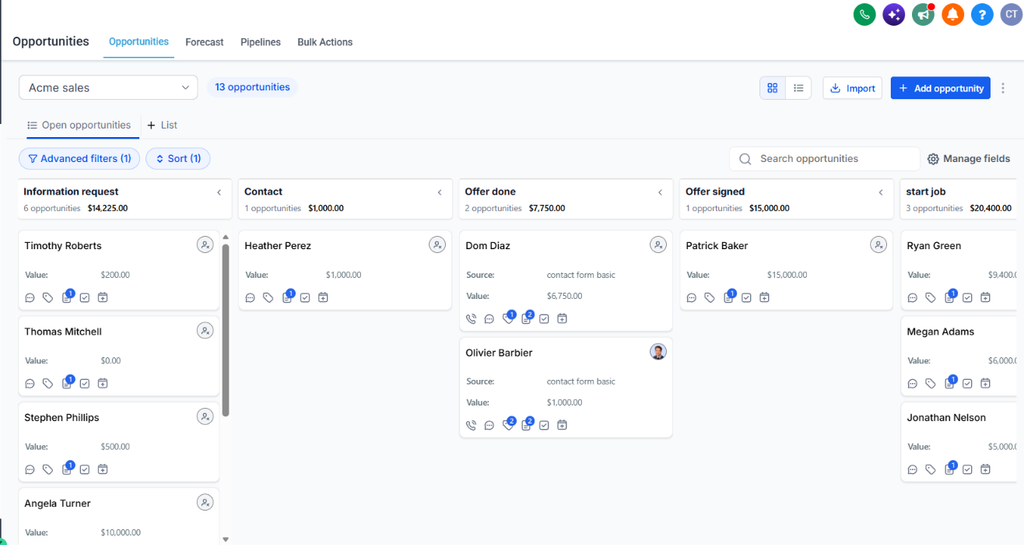
A sales pipeline is a visual board that shows where every client is in your sales process.
Think of it as a set of columns. Each column is a stage, and each client is a card that moves from left to right until the deal is closed.
A real pipeline answers three questions at a glance:
- Who is in my sales process right now?
- Where is each one: waiting for a quote, waiting for a reply, waiting for payment?
- What should happen next with each one?
It’s not just a list of names. A list tells you who exists. A pipeline tells you what to do.
It also isn’t a complicated enterprise tool. A good pipeline can have five or six stages, what matters is that every client has a stage, and that everyone on your team uses the same ones.
So, having this in mind, you are ready to learn the step-by-step process to create a sales workflow.
The Secret Nobody Told You: Create a High-Conversion Sales Workflow
Remember the client from the introduction? Leads arrived by email, by phone, and through video calls. Every channel worked. The problem was that none of them talked to each other. So the solution wasn’ret just to automate, it was to centralize the entire system.
Centralizing means that, whatever the way a client reaches you, they end up in the same place.
In practice, that looks like this:
- A form submission creates a new card in your pipeline
- A calendar booking does the same, with the appointment details attached
- An email or message from a new client is linked to their contact record
- A phone call gets logged, so it doesn’t live on the back of a post-it
The result is one customer record per person, with the full history of the conversation, and one board where you can see every opportunity.
This is also what makes the automation part possible. You can’t automate follow-up for leads you can’t see. Once everything lands in one place, every automation you build later (reminders, follow-up emails, task assignments) works on all your leads.
Step 1: Map Your Sales System, Step by Step
Before you open any software, grab a pen and paper or a blank document.
The most common mistake is building a pipeline before understanding your own process. A tool can only automate what you’ve already defined.
We highly recommend you to work on this task with your team.
A. Write down how clients reach you.
List every entry point: email, website form, calendar bookings, phone calls, referrals, social media messages. Be honest, even about the messy ones.
B. Write down what happens from first contact to payment.
Describe the journey as it really happens today, not as it should be. For example: the client asks for a quote, you send it, they accept or ask questions, you issue an invoice, they pay.
C. Turn those moments into stages.
Each important step becomes a stage. Keep the names simple, using words you’d say out loud. If you can’t explain a stage in one sentence, it’s probably two stages, or none.
D. Decide what should happen at each stage.
For every stage, answer two questions: what’s the next action, and who does it? For example: A quote sent might need a follow-up in 48 hours. An invoice generated needs a payment reminder if it’s still open after a few days.
E. Find where deals get stuck.
Look at your last 20 to 30 clients and ask where they stalled or disappeared. Those are the stages where an automation will earn you the most.
You’ll end up with one page that describes your whole sales process. That page is your blueprint, and everything in the next steps comes from it.
Suggested pipelines to include in your blueprint: Leads & Quotes, Sales, After Sale.
Step 2: Choose an automation Tool (TwiLead)
You already have your blueprint on paper. Now let’s turn it into a real board.
In this case we are using TwiLead, most businnesses choose it because it includes all the features you need to capture more leads, automate follow-ups, book more appointments, and manage every customer from one place. It keeps things simple, reduce software cost, and allow you to grow without efforts.
Step 3: Create a Pipeline
Pipelines are the feature that turns your blueprint into something visual. Instead of hunting through your inbox, calendar, and notes, you see every client on one board, organized by stage. With one look, you know who is waiting for a quote, who needs a follow-up, and who still has to pay.
Before you create anything, let’s clear up two words people often mix up:
- A pipeline is the board. It’s the structure, made of stages, that represents your sales process.
- An opportunity is a card on that board. It’s one potential sale, linked to one contact, with a value and a status.
Think of the pipeline as the road and each opportunity as a client traveling along it. You build the pipeline once. Opportunities get created again and again.
If you are already subscribed to the free Twilead´s trial, login into your session.
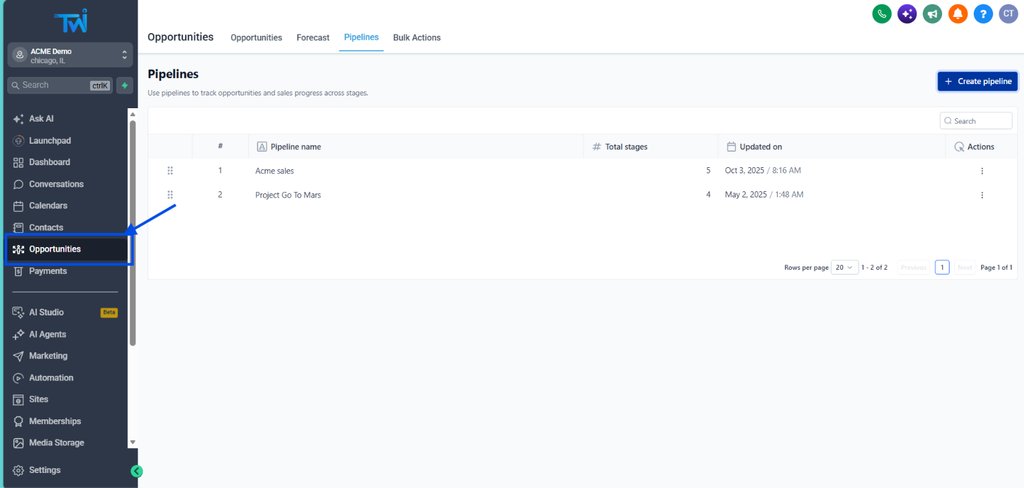
Go to the left sidebar, click Opportunities.
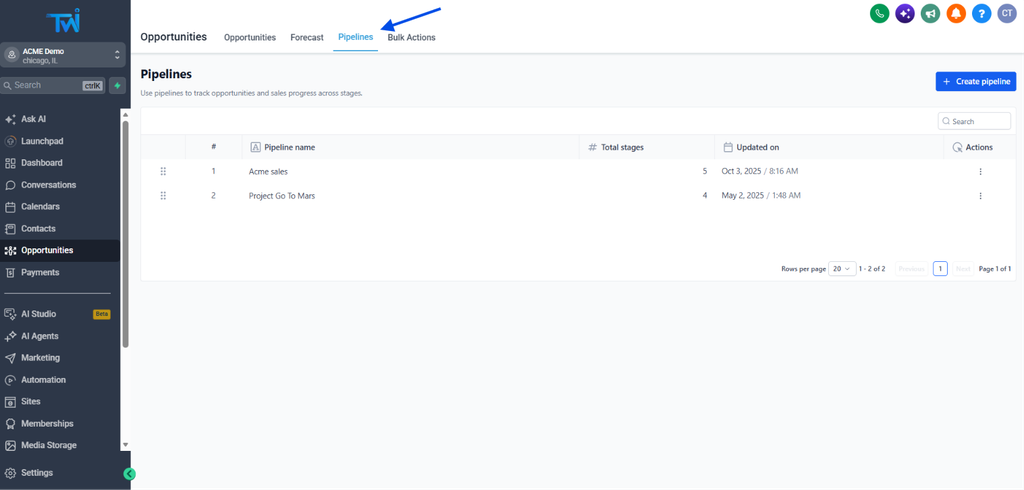
At the top, you’ll see a Pipelines tab. Click on it.
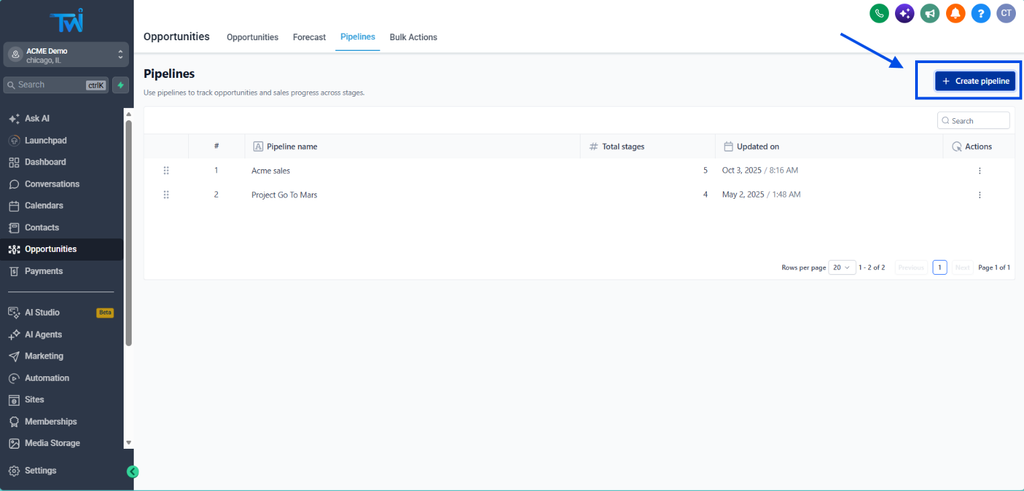
Click the “Create pipeline” button
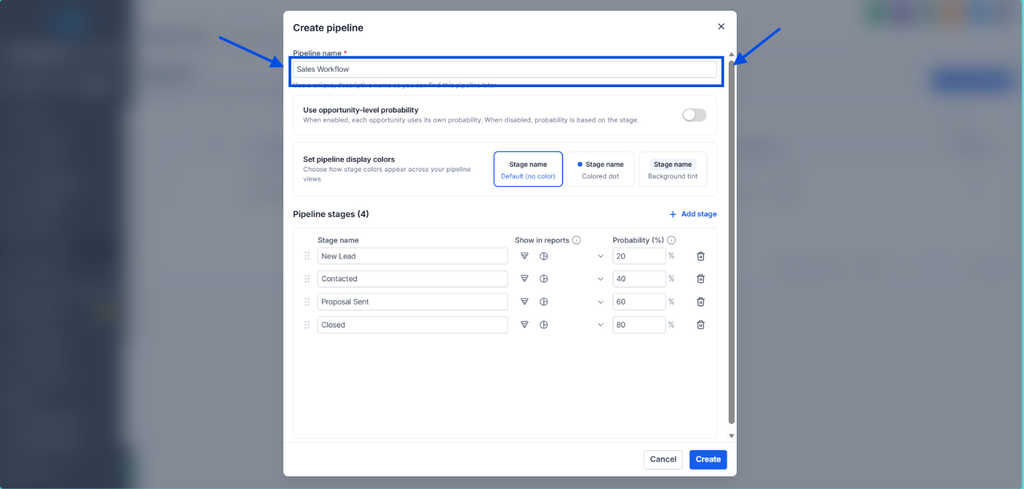
And name it!
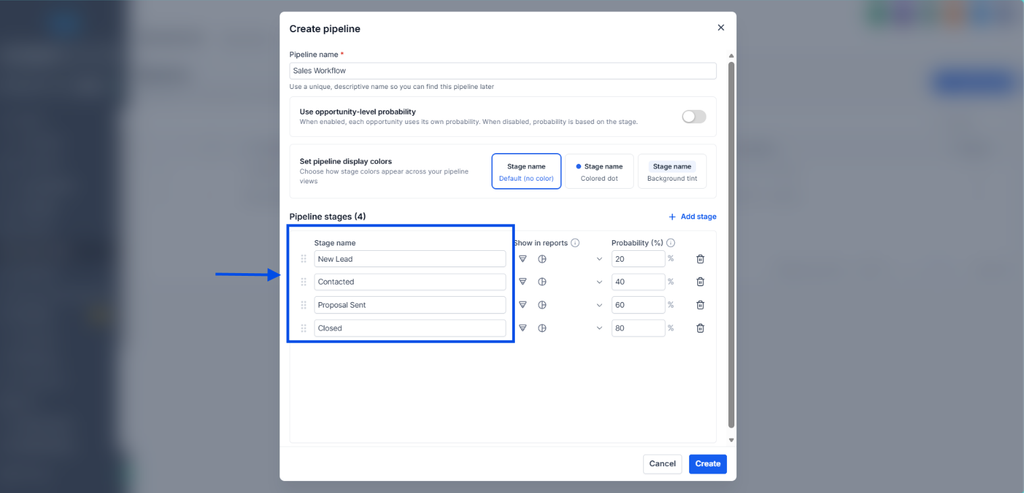
Customize the basic info of your pipeline, in this case the most important step is to put a name to each stage -use your blueprint for it-.
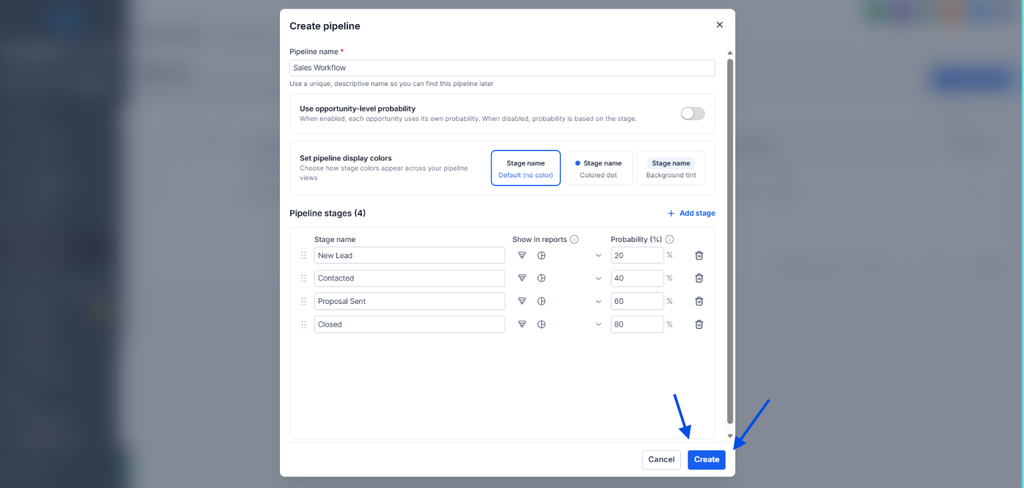
Click the “Create” button
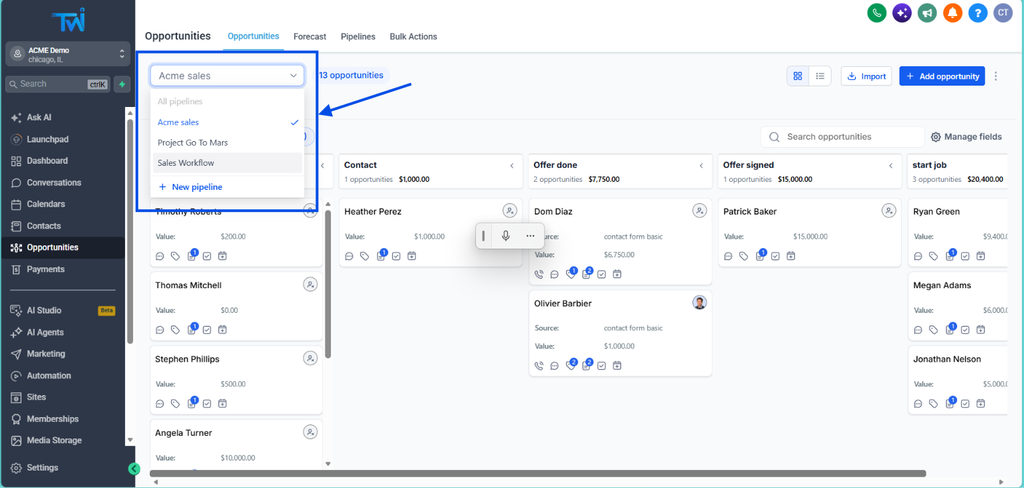
Go back to Opportunities, you will find your new pipeline, ready to be used
Ok, now you have a sales pipeline created. It looks pretty good, right? But how can you make contacts move automatically to each stage? That’s where the magic of TwiLead happens, all thanks to automations.
You can stop here : you made a first step to a better sales organisation. Now you easily know where each opportunity/leads is: you can manage it manually, or you can go a step further to automate and save time.
Step 4: Automate Your Pipeline and Put Your Sales Workflow on Autopilot
The real value of a pipeline isn’t the board itself. It’s being able to build a sales workflow, using automations based on what happens to each opportunity. Without them, you’d still be dragging cards by hand.
Before creating your first automation you should know this: every automation is built from two pieces:
- A trigger is the event that starts it. For example: “someone fills out a form.”
- An action is what TwiLead does in response. For example: “create an opportunity in the Quote Requested stage.”
Think of it as “when X action happens, do that.” Once you see it this way, every automation becomes a simple sentence.
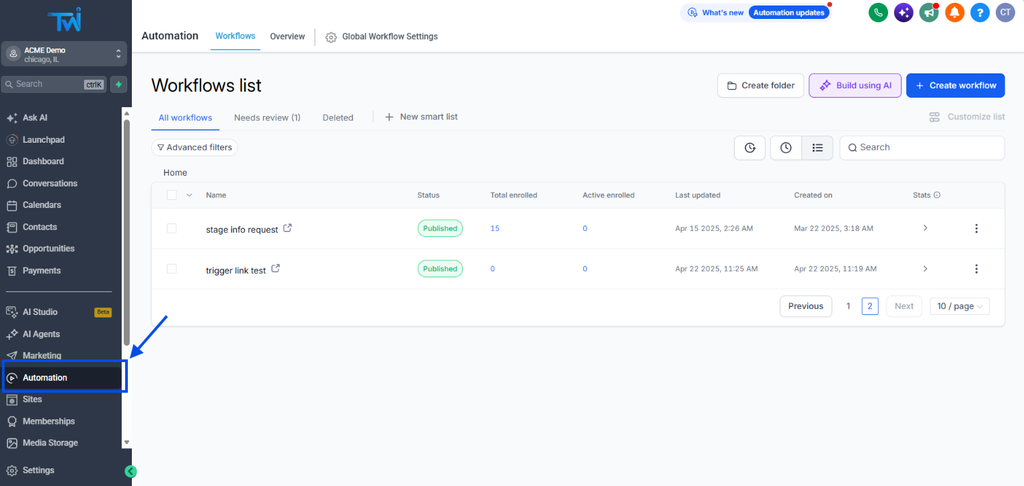
Go to the Automation section.
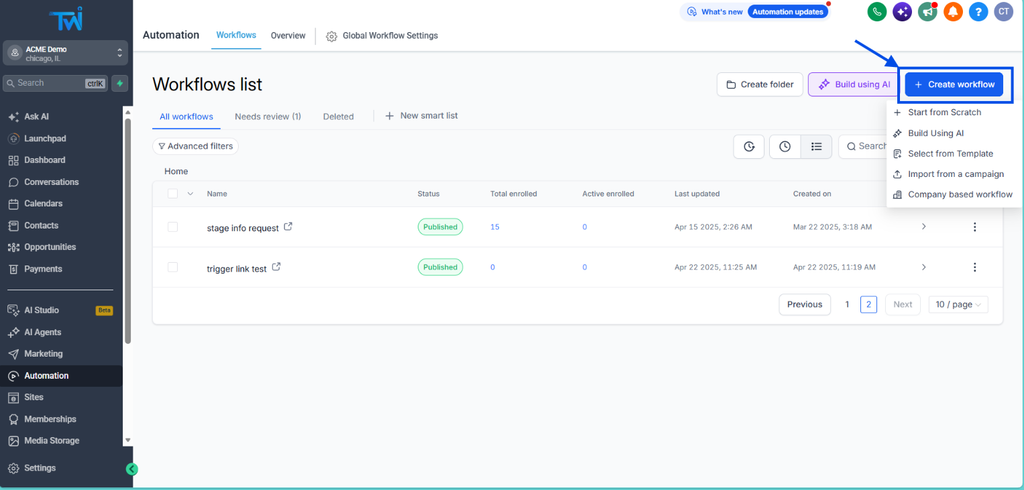
Click on Create Workflow
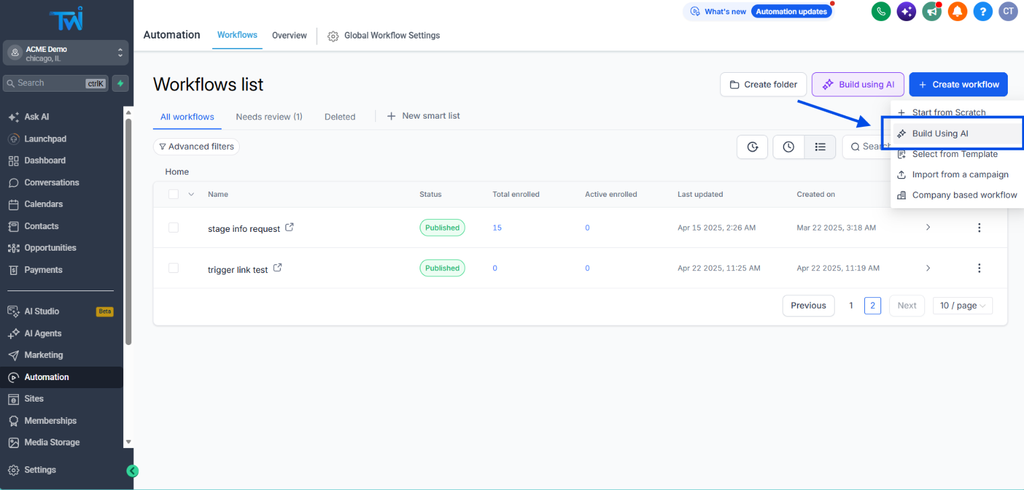
Here you have multiple options, our favorite one is to ask our AI. To choose this option click on Build Using AI
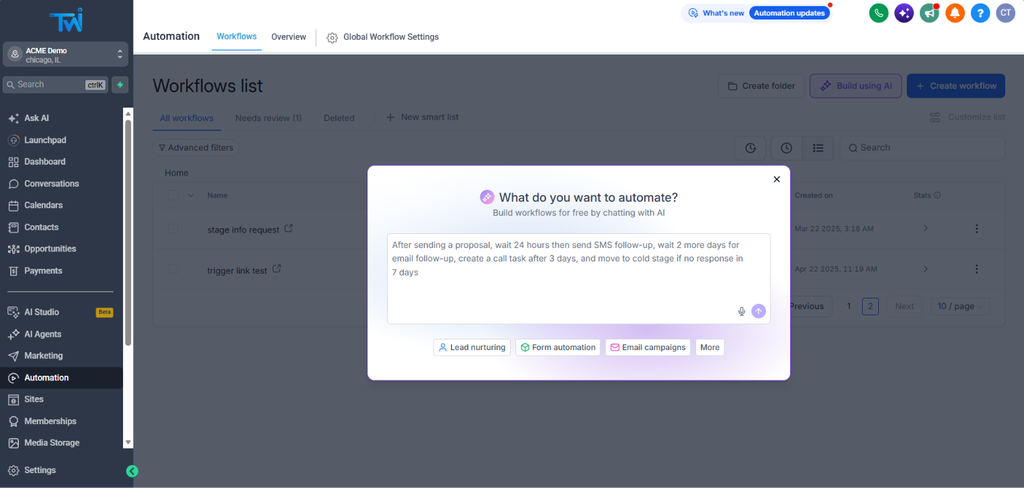
Describe all the steps you want to automate, and it would automatically create a sales workflow, just in seconds.
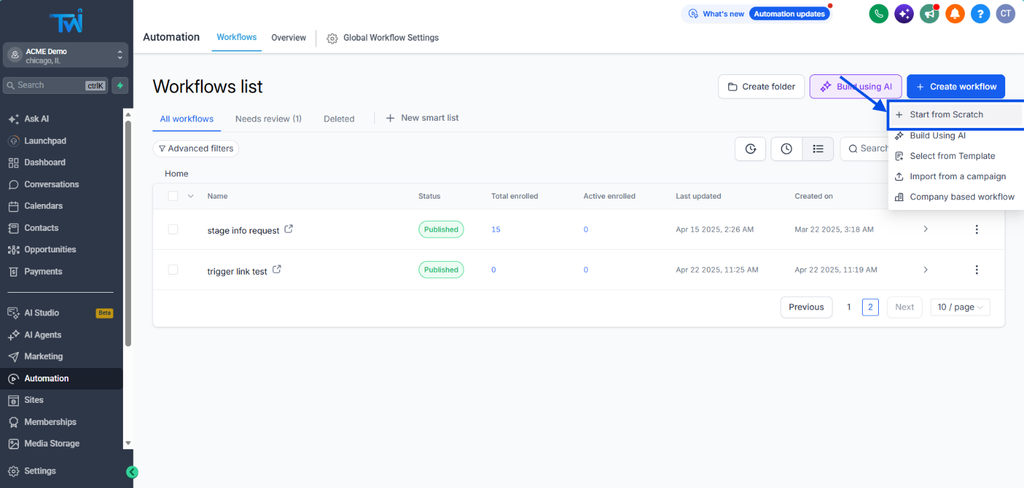
Otherwise, you can build your own automation from scractch, you just need to click Start from Scratch
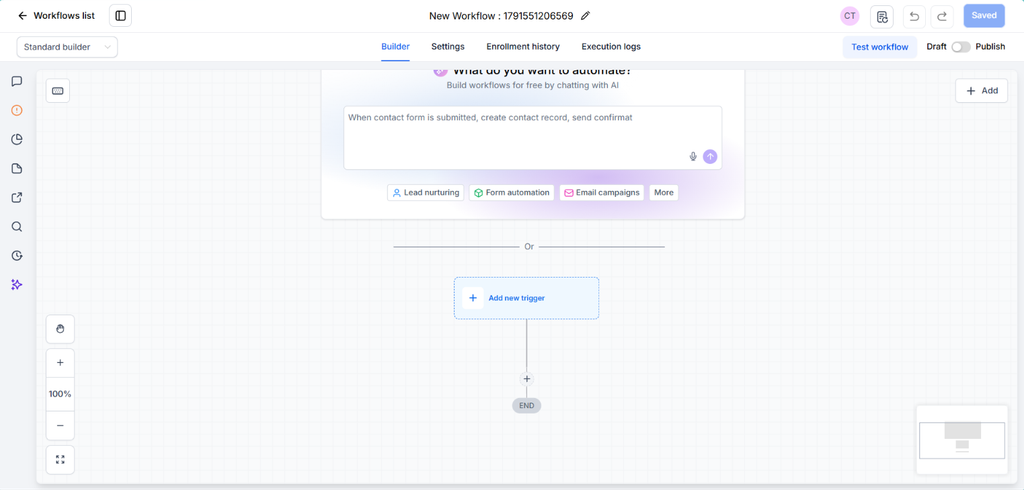
Even if you choose this option, you are always able to ask for help to the AI Assistant.
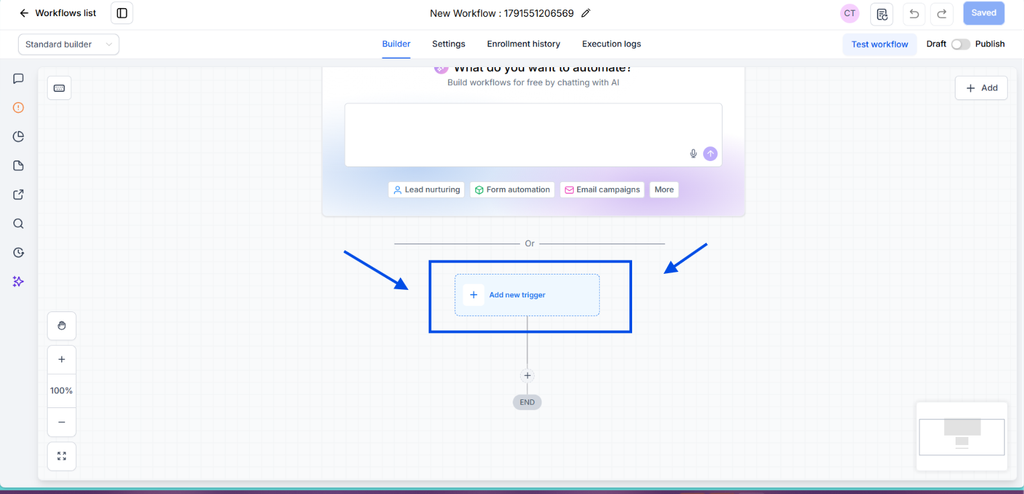
To create your first automation, click on Add New Trigger.
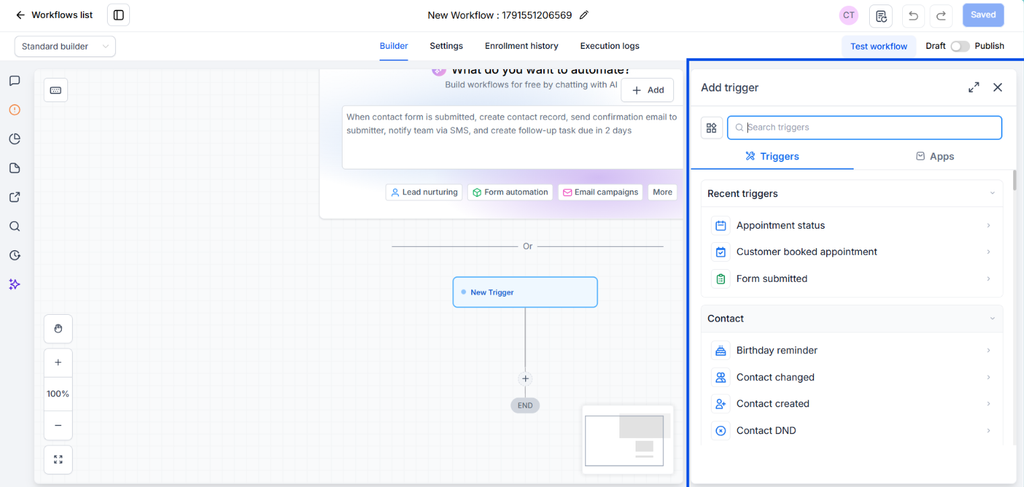
You will find multiple options, always appearing at the right side bar menu.
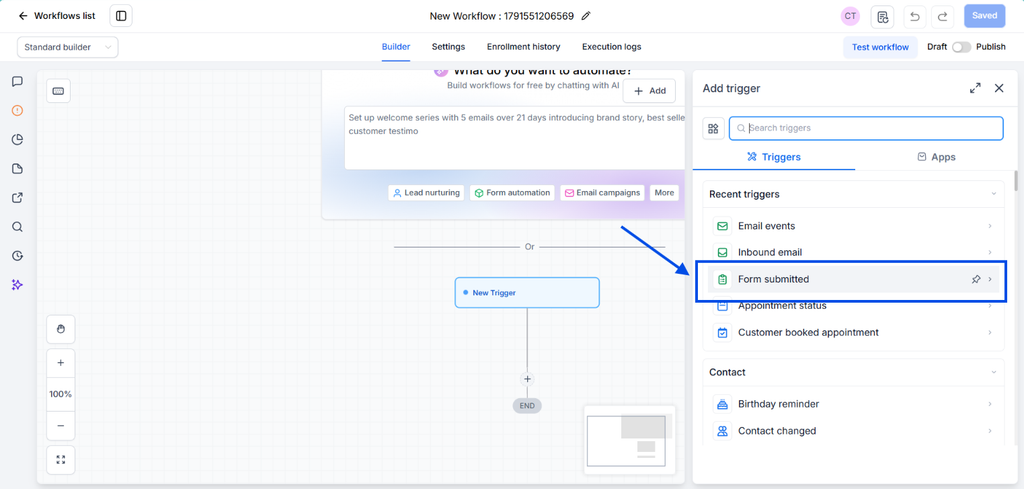
In this case, let´s imagine you want to add a lead into your sales pipeline everytime somebody fills an specific form. Click on Form Submitted
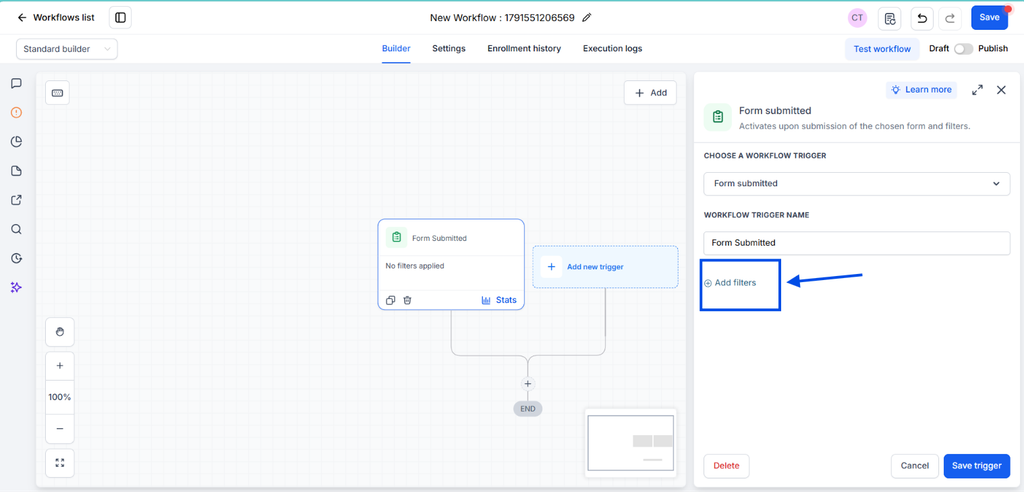
Click on Add Filters to choose which form is going to be used.
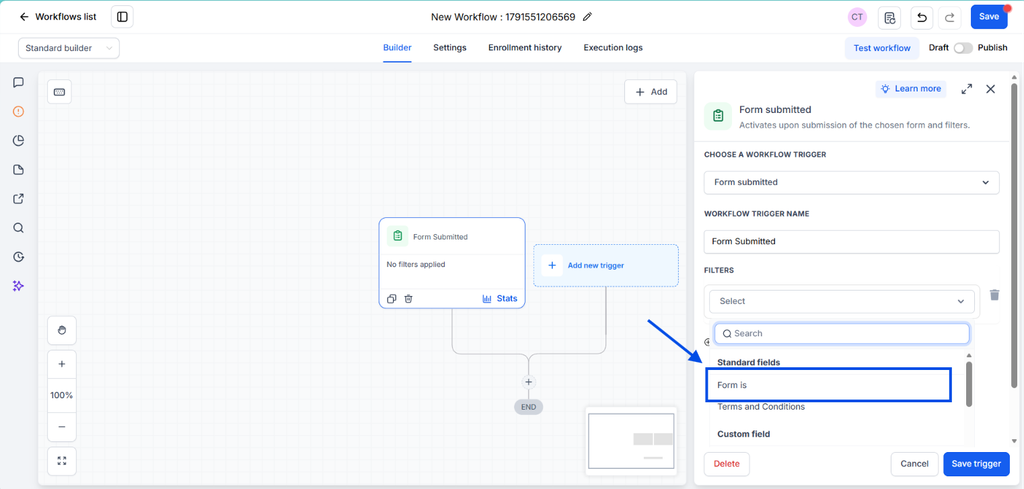
Click the “Form is” option
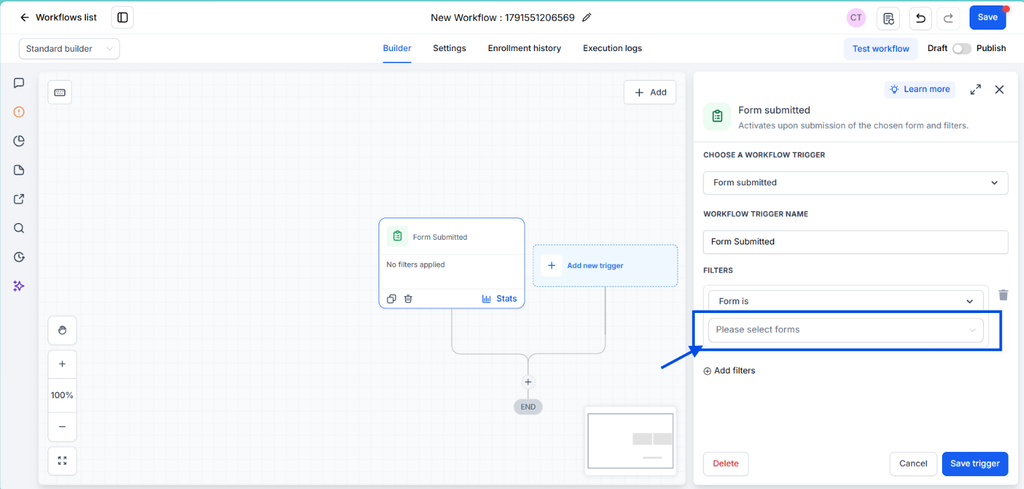
And choose the right form in the list.
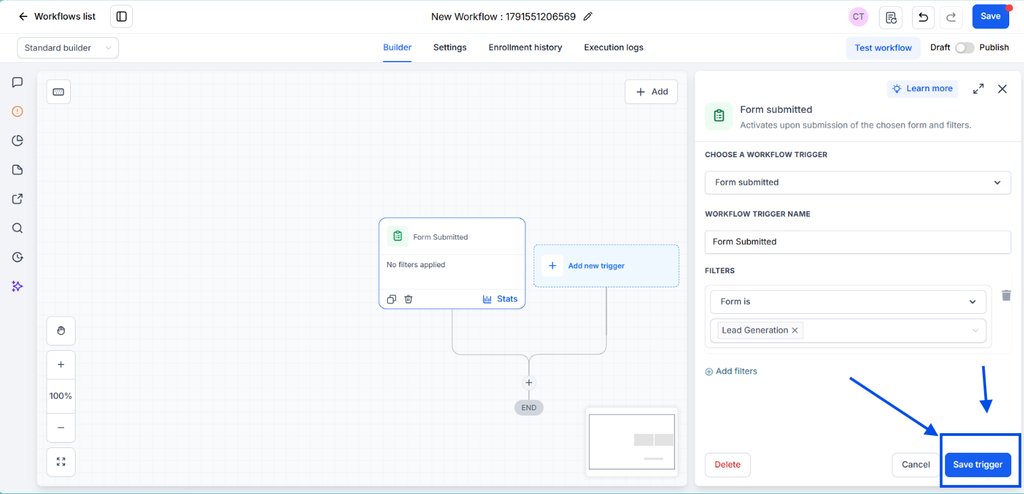
Click the Save Trigger button
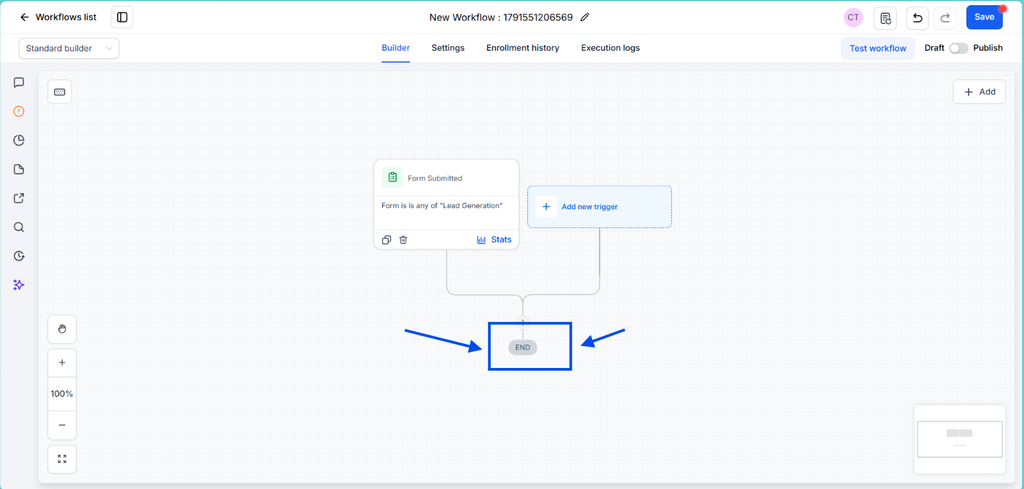
To choose what is going to happen next, click the “+” symbol.
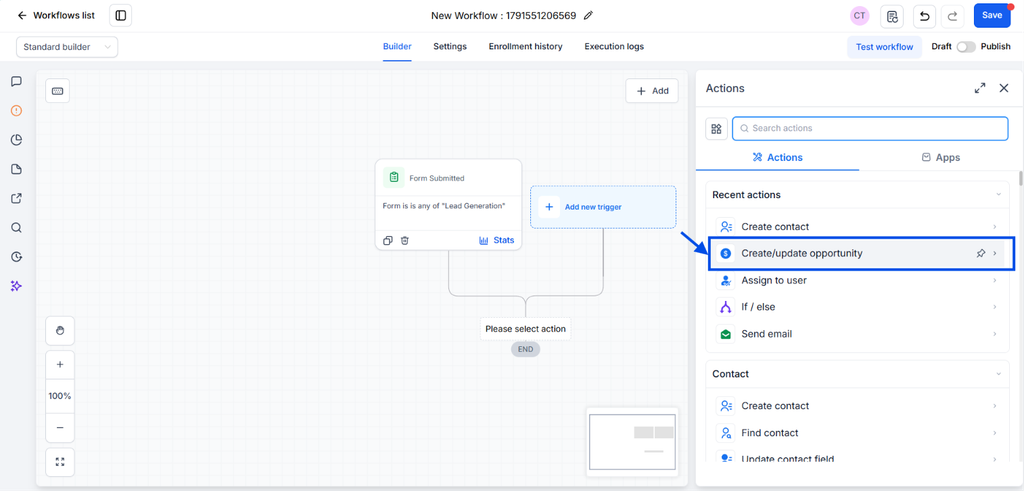
In this case, because the goal is to add the contact into the Sales Pipeline as a lead, you have to choose the Create/Update Opportunity.
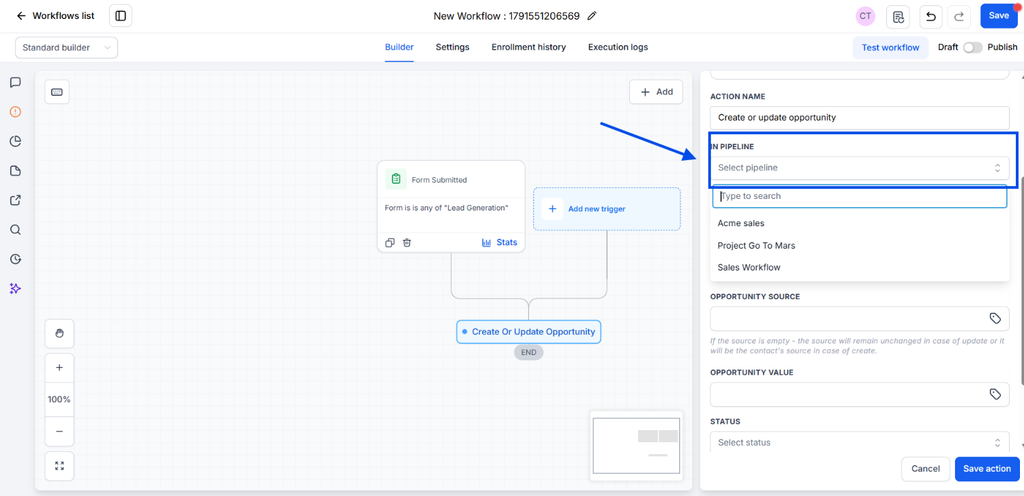
Choose the right pipeline.
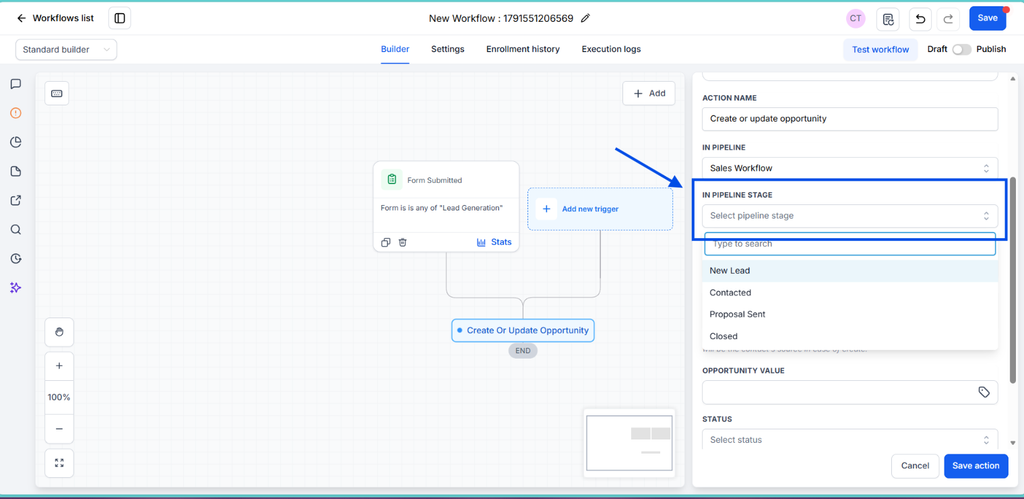
And the right pipeline stage, in this case: New Lead
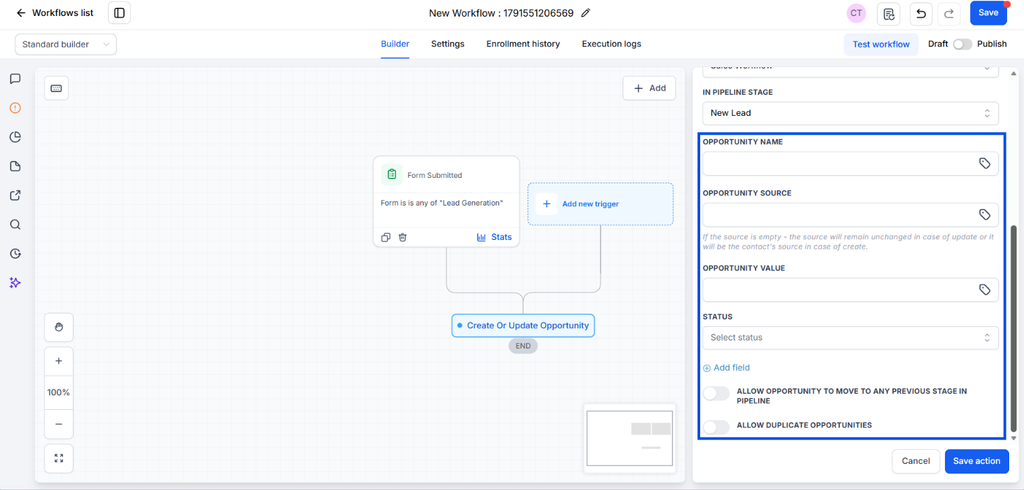
You have multiple customization options, feel free to choose what fits the best your tracking sales workflow, or ask our specialists for professional advice on how to use it based on your specific business needs.
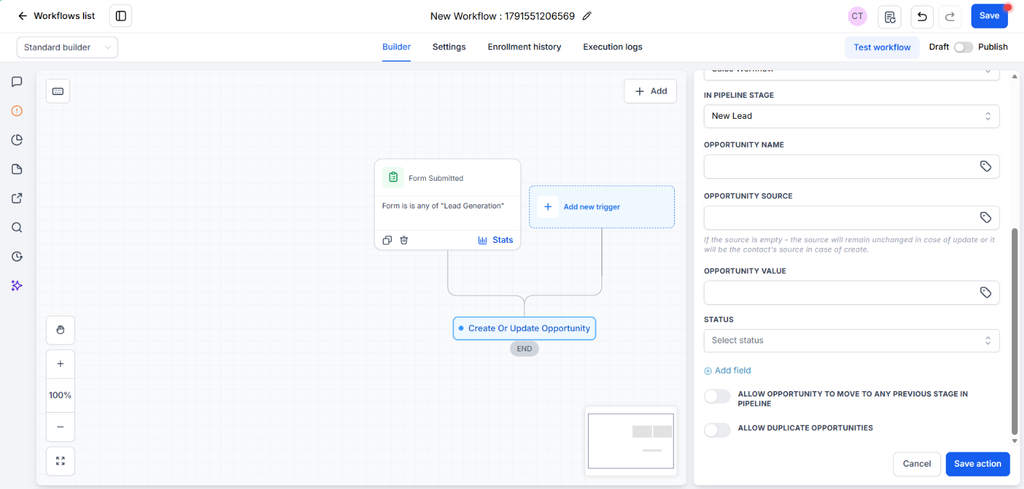
Be sure of Save Action to see any changes.
You can keep adding steps and actions like: send notifications to your team, or automatically move the contact to another stage of the pipeline according to their actions.
Let´s imagine you want to send a customized email to each new lead on this sales workflow.
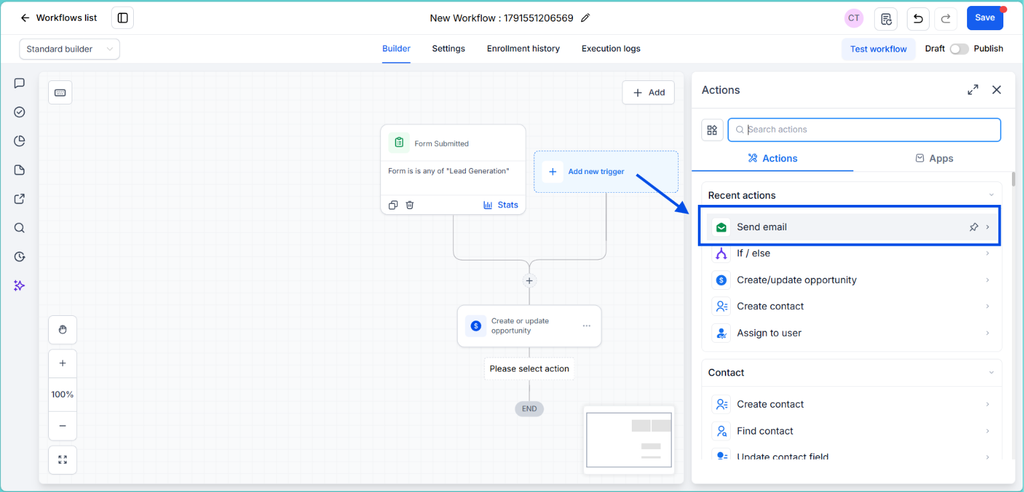
In this case, click again the + symbol, and then click on Send email.
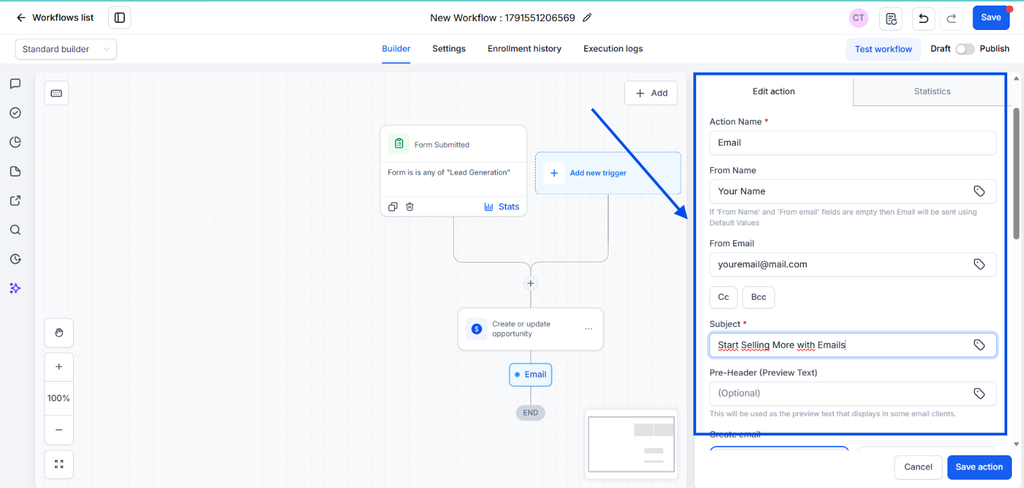
You just need to complete the blank spaces with basic information: Sender name, sender adress and the Subject.
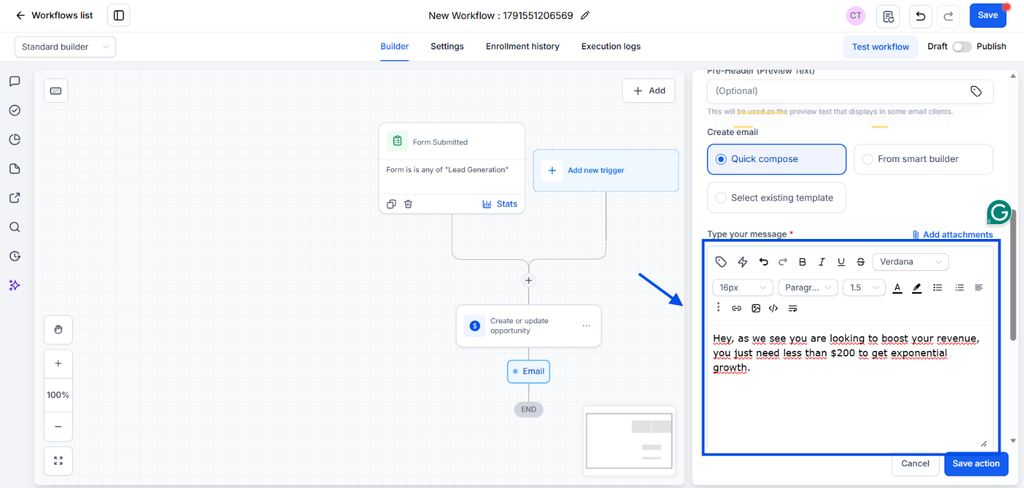
And write the email, or choose a template. And, as usual, click on Save Action.
We dive deep into email campaigns in this article
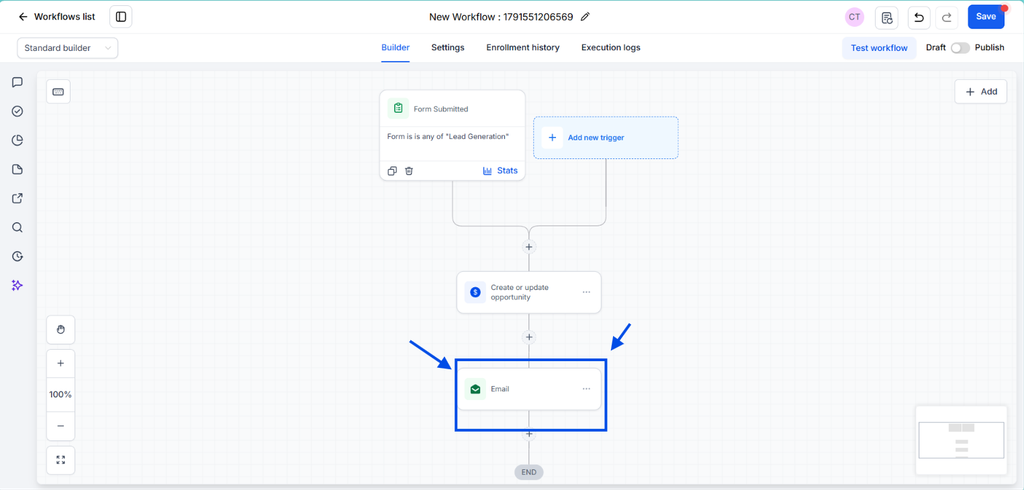
That’s all! Each new contact who fills your form will be added to your sales pipeline and receive an email notification.
You can add as many actions as you need to turn your sales pipeline into a high profitable sales workflow.
We share some ideas of basic automations that you can create to boost your conversions and sales.
Simple automations to include into your sales workflow
You don’t need dozens. These are the most universal ones, and they work for almost any small business.
Bring new clients into your pipeline
- Someone fills out a form. A contact is created and automatically added to the stage you choose, like Quote Requested or New Lead.
- Someone books a video call or appointment. The same thing happens, with the meeting details attached to the opportunity.
- Someone sends you an email or message. The contact is created or updated, and the opportunity appears on your board.
- Someone calls and you miss it. An automatic text goes out (“Hi, how can we help you?”) and an opportunity is created at the same time, so the call never ends up on the back of a post-it.
Move clients through the stages
- A quote is sent. The opportunity moves to Quote Sent, and a follow-up is scheduled 48 hours later.
- The client replies. The opportunity moves forward and the follow-up sequence stops, so they don’t keep getting messages after answering.
- The client accepts. The opportunity moves to a new stage, for example: Invoice Generated.
- The invoice is paid. The opportunity moves to another stage, for example: Invoice Paid, and a review request goes out.
- No answer after a few days. The opportunity moves to Inactive, so your board stays clean and honest.
If you feel overwhelmed, start with the first three. Getting every lead into the pipeline automatically already solves most of the chaos. You can add the rest one at a time.
Don’t want to build it by hand? Ask TwiLead’s AI to do it for you.
You can ask TwiLead’s AI to create the automation for you, just by writing a prompt. Describe what you want in plain words, the same way you’d explain it to a colleague.
For example:
“When someone fills out my contact form, create a contact, add them to the Leads & Quotes pipeline in the Quote Requested stage, and send them a confirmation email.”
Or for the follow-up:
“When an opportunity moves to Quote Sent, wait 48 hours. If the client hasn’t replied, send a friendly follow-up email and create a task for me.”
The AI builds the sales workflow, and you review it before turning it on. It’s the fastest way to get started, especially if you’ve never built an automation before.
Tip: Test each automation with your own contact before turning it on for real clients. Submit your own form, watch the card appear in the right stage, and check that the emails and calls work as expected.
Do you feel you don’t have time for all this? Get a sales pipeline created by our experts for free.
From Lead to Closed Deal: What a Sales Workflow Actually Earns You
Building a sales workflow from the blue print to the implementation takes an afternoon. What it gives back lasts for months or years.
We have to admit that one of the main benefits our clients mention is finally having some peace of mind after a long time. That’s already a win, but it’s not the only one.
Here are the main advantages.
1. Faster replies, more deals closed
Clients not always choose the best offer. They choose the business that answers first and makes the next step easy.
With a sales workflow, the confirmation goes out right away, the quote follow-up arrives 48 hours later, or even less and the reminder shows up before the lead cools down. You stay present without chasing anyone.
2. Your team knows what to do
When each opportunity has an owner and a stage, nobody asks “who’s handling this one?” Everyone sees the same board and knows which clients need attention first.
That also makes growth easier. You can add a new team member or a new service without adding more chaos.
3. You get numbers that you can trust
Once your clients move through clear stages, your dashboard starts telling you things your inbox never could:
- How many quotes are waiting for a reply
- Where deals get stuck most often
- How many leads actually become paying clients
- Which channels bring the clients who really buy
Instead of guessing, you can fix the exact stage where you’re losing revenue.
4. Your time and your head back
Remember the client from the introduction? He wasn’t short on leads. He was tired of always chasing them.
After setting up his sales workflow, every lead and sale was tracked, every quote was followed up, and every invoice had a status. And for the first time, he could take a vacation with a mind clear as crystal, because the system was doing the work for him.
That’s what organizing all this really earns you: more sales closed, and the peace of mind to enjoy the business you built.
Conclusion
When quotes come from everywhere, the problem is rarely a lack of leads. It’s the lack of a system that decides what happens next.
A sales pipeline gives you the structure: one place where every client lives, with a clear stage.
A sales workflow gives you the action: automatic follow-ups, status updates, and assignments that run without you remembering them.
Together, they turn a messy process into a system that works in the background, even when you’re busy, on a job site, or away.
You don’t need to build everything at once. Start with the three entry automations so every lead lands in your pipeline. Then add the follow-up emails. Then keep improving, one automation at a time.
And if you’d rather not do it alone, our team can build your sales pipeline and workflows with you, for free.
Ready to finally have peace of mind?